

Setting up your Discord bot
Setting up the Discord bot is quick and easy and only takes a few steps if you’re using an existing Clavata policy.Adding the API Key and Policy
In order to allow your Discord Bot to communicate with your Clavata instance you will need to provide an API key and a Policy Id. Both of these are simple to get. Your API Key was provided to you when setting up your instance and you can access your Policy Ids whenever you want.- Your API key will be a long series of letters and numbers.
- Your Policy Id can be found in your Policies tab in Clavata and to the right of a policy’s name.
Adding the bot to your server
You will need a specific link in order to add the Discord bot to your server, along with the appropriate permissions. Server owners and admins typically have this permission but your admin roles and responsibilities may differ from server to server. Follow the below instructions to add the bot to your server.- Paste the URL you’ve been given by Clavata into your browser of choice.
- Note: you will need to be logged into Discord.
- You will see a pop up asking you to add ‘ClavataBot’ to a server.
- In the ‘ADD TO SERVER:’ dropdown, select the server you would like to add the bot to.
- Note: if you own multiple servers you will see a list of all of them. Be sure to select the correct one to ensure the bot is added to the correct server.
- Clicking ‘Continue’ will allow you to proceed to adding the bot.
Clavata bot commands
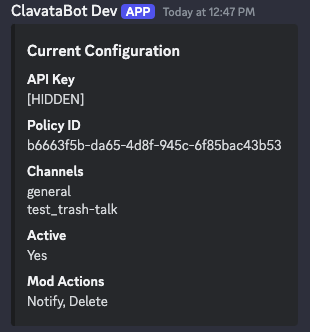
- API Key - your API Key used by the bot to communicate with your Clavata instance
- Policy ID - is the current policy your bot is using to evaluate content
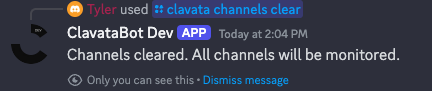
- Channels - the current Channels your bot is monitoring and evaluating
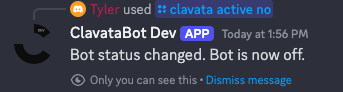
- Active - whether the bot is actively making decisions or not
- Mod Actions - displays the current Mod Actions the bot is taking when it finds a violation against your policy
- Notify the admin via DM
- This notifies admins via a DM that a violation was found
- Delete the message
- This will delete the violating message
- Warn the user
- This will send a warning message to the user about the violating message
- Timeout the user for 10 minutes
- This will prevent the user from doing any actions on the server for 10 minutes
- Kick the user
- This will kick the user from the server but will allow them to join back if they have an invitation link
- Ban the user
- This will ban the user from the server. They can’t join again unless the ban is removed
- Notify the admin via DM
- This notifies admins via a DM that a violation was found
- Delete the message
- This will delete the violating message
- Warn the user
- This will send a warning message to the user about the violating message
- Timeout the user for 10 minutes
- This will prevent the user from doing any actions on the server for 10 minutes
- Kick the user
- This will kick the user from the server but will allow them to join back if they have an invitation link
- Ban the user
- This will ban the user from the server. They can’t join again unless the ban is removed
We’d Love to Hear From You
Whether you have a suggestion, feedback, or a bug to report, here are the best ways to get in touch:- In the App: Use the Feedback button for direct suggestions.
- On Slack: Reach out to the team in your shared channel.
- With your AM: Talk to your dedicated account manager.
- Via Email: Send a message to support@moonbounce.io.
- Security, availability, or other incidents: Use the in-app Feedback button or email support@moonbounce.io. See Customer Feedback for what to include.