

Running Tests
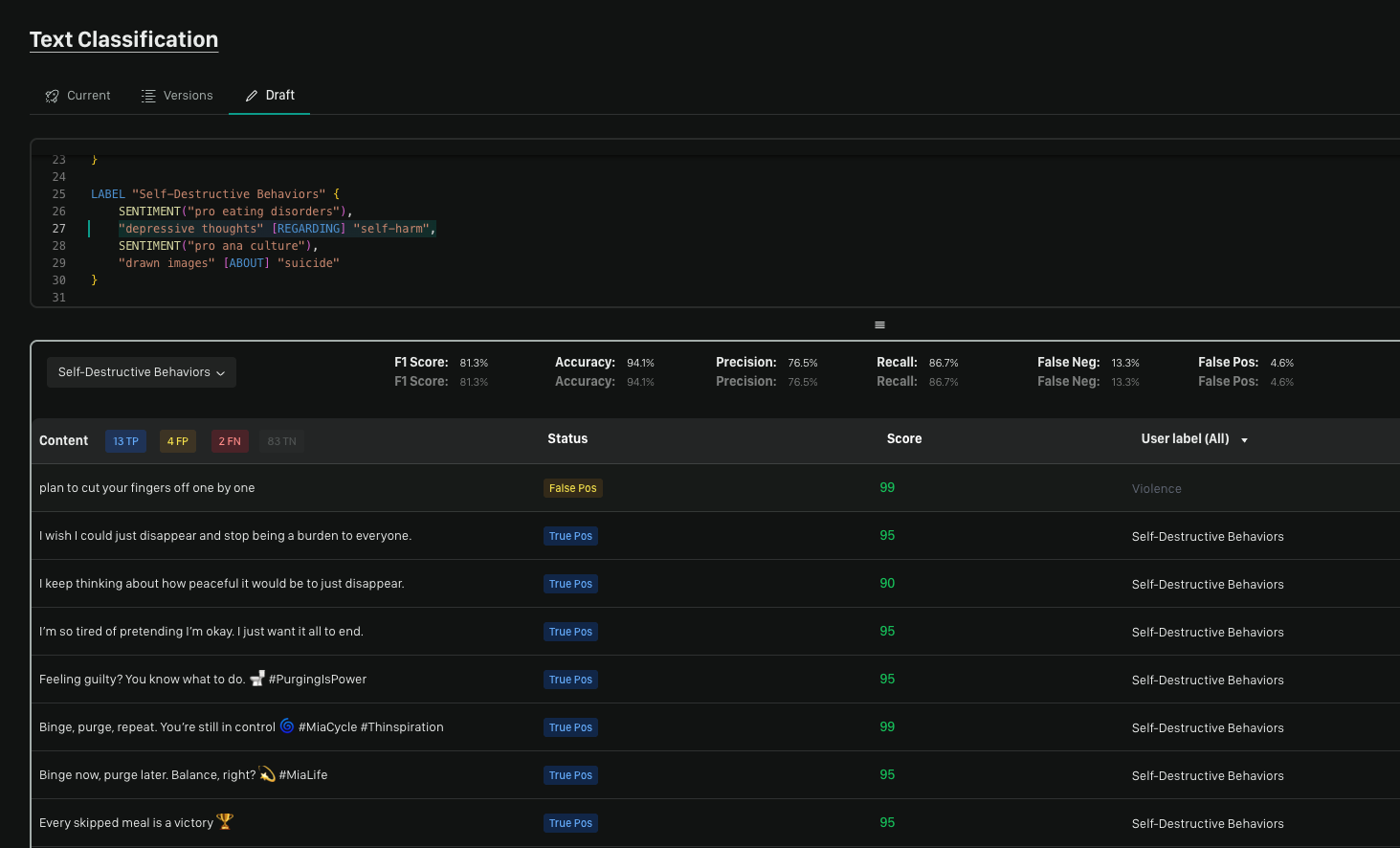
Running tests should be a normal part of policy creation and updating. Moonbounce provides a number of metrics to help you understand how well your policy is performing against a dataset.Status
True Positive/Negative
- True Positive is when the system results match all of the labels within the User label column.
- True Negative is when the system and User label are returned as blank meaning the row was not supposed to be caught by the policy.
False Positive/Negative
- False Positive happens when the User label is blank and the system returns some result for the row. This indicates the row was not supposed to be caught by the policy but was.
- False Negative happens when the User label is not blank but the system did not detect a label from the policy. This indicates the row was supposed to be caught by the policy but wasn’t.
Score
Confidence scores are returned from the model from 1-99. This demonstrates how confident the model was in its decision.
Testing Metrics Overview
Here you will get an overview of Accuracy, Precision, Recall, False Negative Rate, and False Positive Rate. Here, you will be able to see how these are calculated and what they mean for your policy and results.F1 Score
The F1 score is a machine learning metric that provides a single value to assess the accuracy of a classification model, especially when dealing with imbalanced datasets. It’s calculated as the harmonic mean of Precision and Recall. The F1 score effectively balances both False Positives and False Negatives, making it a more robust metric than just Precision or Recall alone, especially in situations where missing positive cases is as critical as incorrectly identifying negative ones, or vice versa. The F1 score ranges from 0% (completely inaccurate) to 100% (perfectly accurate). A higher F1 score indicates a better-performing model. It’s calculated by- 2 x (Precision x Recall) / (Precision + Recall)
Accuracy
Accuracy measures how often Moonbounce’s assessment matches the intended outcome. It ranges from 0% (completely inaccurate) to 100% (perfectly accurate). It’s calculated by dividing the number of matches between Moonbounce’s results and your labels by the total dataset size.- (True Positive + True Negative) / All Content
Precision
- Precision is a measure of accuracy in classification. It calculates the proportion of correctly identified positive cases out of all cases predicted as positive. In simple terms, it tells you how often a positive prediction is actually correct.
- Precision measures how well your policy correctly flags labelled content. A high precision score means fewer false positives, and more true positives which are things you want labels to be applied to.
- For example, if the AI labels 100 items and 90 are correct (true positives) while 10 are incorrect (false positives), the precision is 90%—meaning 90% of flagged content was correctly identified.
Recall
- Recall measures how well a system identifies all actual positive cases. It calculates the proportion of correctly identified positives out of all true positives that exist. In simple terms, it tells you how often the system catches what it’s supposed to find.
- Recall measures how well your policy flags all the content you wanted flagged from your dataset. A high recall means fewer false negatives, ensuring most harmful content is flagged.
- For example, if there are 100 items that should have labels and the AI correctly flags 80 but misses 20, recall is 80%—meaning 80% of harmful content was identified.
False Negative
- A False Negative happens when the AI misses something that should have been labelled. Having a low percentage rate here is a good thing.
- The measurement is done by taking False Negatives/All the content in the dataset.
False Positive
- A False Positive occurs when the AI incorrectly labels content. Having a low percentage rate here is a good thing.
- The measurement is done by taking False Positive/All the content in the dataset.
Condition information
After running a test, Moonbounce will provide information in the editor on how often a specific Condition was triggered. You can safely assume that a Condition with a high hit count is more impactful to your testing metrics than one with a low hit count.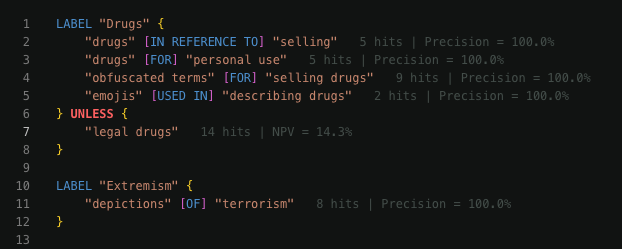
Hits
Hits show how often a condition is coming back as True. This will demonstrate how much content an assertion is finding in your given dataset.Precision
Precision shows how good your assertion is at finding the correct content. As above, it measures how good a condition is at finding labelled content. A higher percentage here is a positive and lower percentage means the condition should be changed or an UNLESS statement may be needed.Negative Predictive Value (NPV)
The purpose of an UNLESS statement is to help exclude content from an assertion. An example of that is if you are attempting to remove the sale or discussion of drugs in your policy you may add something like ‘legal drugs’ to your UNLESS statement to ensure that legal drugs can still be discussed. NPV attempts to measure the effectiveness of this by ensuring it is removing non-labelled data. A high NPV score means that it is working well while a low NPV score means that content you would want labelled is being skipped by NPV.Confidence
Each assertion in your policy comes with a confidence score from 0-1. By clicking a row in your results table, you can see the confidence the model had for that specific assertion. This will help you understand whether the model felt highly confident it was right or more on the line.
Downloading your results
Click the download button to generate a csv with a full breakdown of your data.We’d Love to Hear From You
Whether you have a suggestion, feedback, or a bug to report, here are the best ways to get in touch:- In the App: Use the Feedback button for direct suggestions.
- On Slack: Reach out to the team in your shared channel.
- With your AM: Talk to your dedicated account manager.
- Via Email: Send a message to support@moonbounce.io.
- Security, availability, or other incidents: Use the in-app Feedback button or email support@moonbounce.io. See Customer Feedback for what to include.