

LABEL. Labels are really just a way to give a particular set of assertions a name. Moonbounce’s API then returns that name back to your platform whenever you send us content (or other unstructured data) to evaluate. Historically, when you send our API a piece of content (or run a test in our web application), we try to find as many matching labels as we can for each input. Recently, customers indicated that they wanted a way to say, “If Label A is true, then Label B should never be true.” Another way to say this is that there’s a dependency between Label "A" and Label "B" . Well, wish granted! You can now express dependencies in your policies to better control which labels are matched to each of your inputs.
Use Cases
Taxonomies
A common use case for this new feature is the creation of Taxonomies. Taxonomies are trees (or tree-like) structures that represent how different ideas are connected. While Moonbounce’s users have always been able to look for labels that are part of a taxonomy, the “logic” of how those ideas are related had to be represented in your integration with our API. Now, you can represent these taxonomies right in your policy.
Rating systems
Another common use case we’ve been asked for is a way to represent a “rating system”, like the common movie ratingsR, PG-13, and PG. It has always been possible to create labels for each “rating”, but in the past, trying to tell our system that “if something is rated R then you should never apply the PG-13 or PG label” has been a bit cumbersome—requiring the use of complicated UNLESS { } blocks. As a result, most customers chose to just implement the hierarchy of the rating system on their side of the integration. This works well, but it has a downside: When you test in the Moonbounce application, you may end up with some of the examples in the dataset being labeled with R and PG-13 (for example), which throws off the metrics. No longer! You’ll now be able to test accurately and avoid the need to implement this hierarchy as part of your integration.

Two approaches, same result
Before we dive into the actual syntax, it’s worth noting that both of the forms of syntax we show below have the exact same impact. They are simply two ways to achieve the same thing. Why two ways? Because depending on the specifics of your use case, one will likely be easier to write, read, and maintain than the other. Below, we share the syntax, what it means, and when we recommend you use one form or the other.Option 1: UNLESS -> X
We’ll start by talking about our new UNLESS -> syntax because it’s the simplest and most straightforward and will probably be where most users start.
Suppose you have two labels, LABEL "A" and LABEL "B" in your policy, and suppose also that if LABEL "A" turns out to be true for a piece of content, then LABEL "B" should never be true for that same piece of content. You can now express this relationship as follows:
UNLESS -> "A" inside the LABEL "B" block, you’ve now told our system about the relationship—Label "B"’s result now depends on the result of LABEL "A".
This is probably already obvious. But for clarity, the UNLESS -> "X" syntax does not force its label to match when "X" is false. It merely allows its label to match if "X" is false.
When to Use UNLESS -> ?
- You want to make one label depend on whether a different label matched (or not).
- Specifically, this operator allows you to ensure that a label will not be a match if another label is a match for a particular piece of content.
More than one dependency
You can also useUnless -> more than once in the same Label block. The effect will be to cause that label to depend on the result of all the specified labels.
Example Use Case: Images with Overlapping Labels
Imagine you’re moderating visual content with 3 labels whose definitions overlap to some degree:- Realistic (most severe)
- Anime
- Cartoon
- You want to apply the “Realistic” label only if the content is not Anime or Cartoon.
- Anime and Cartoon can coexist, so they should not block one another.
Setup Using UNLESS
Option 2: PRIORITY
The Priority operator is great for defining longer chains of hierarchies. It allows you to define a hierarchy among labels in a dataset, ensuring that only the highest-priority applicable label is assigned to any single item. This is especially useful when labels are mutually exclusive within a shared category.
When to Use the Priority Operator?
- You have multiple labels in a dependent hierarchy (i.e., where one label takes precedence over others).
- You want to avoid tagging the same item with multiple conflicting labels from the same category.
- You need to enforce a clear, logical order of severity or specificity (e.g., content risk levels, maturity ratings).
Syntax
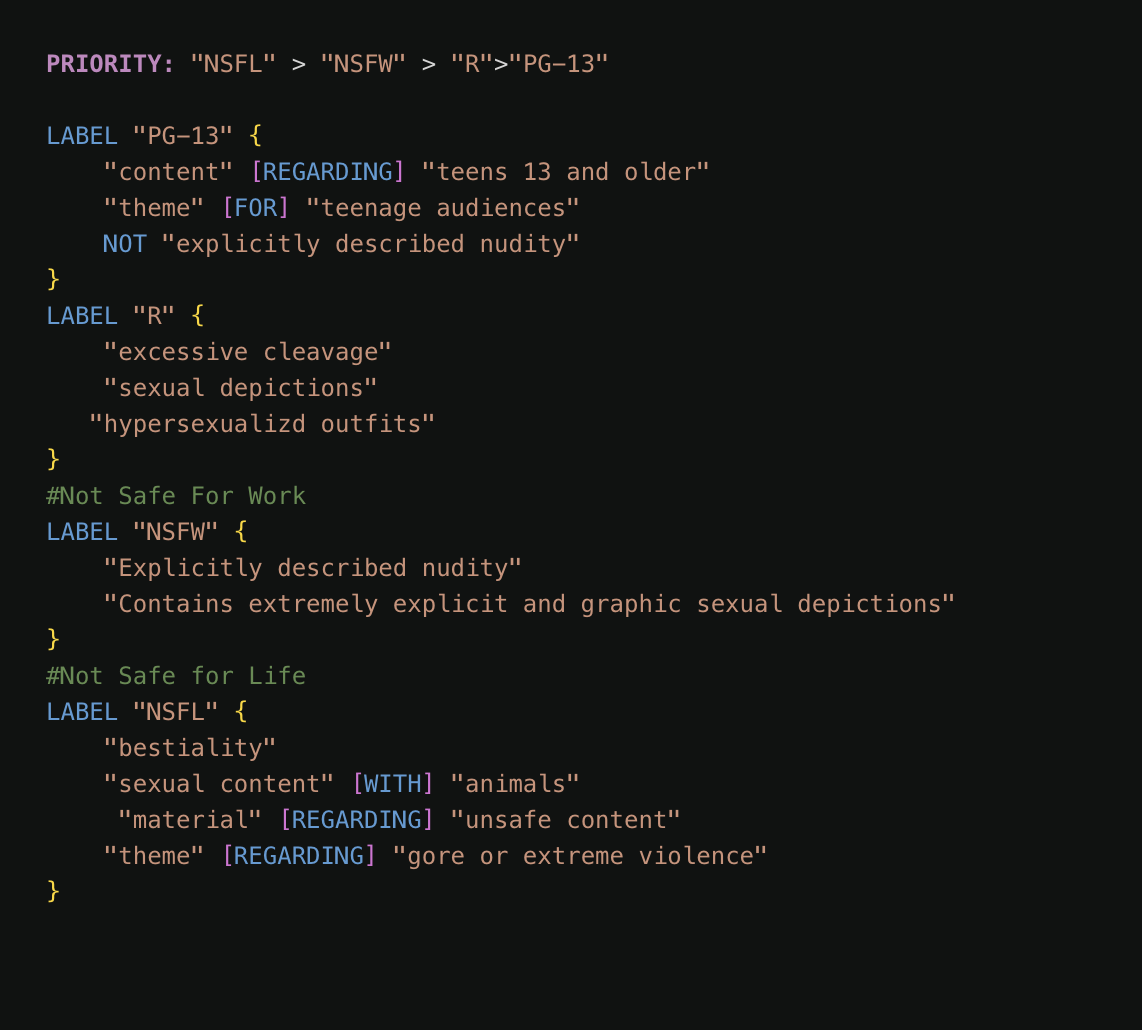
Example Use Case: Content Ratings
Let’s say you’re building a moderation system that assigns content risk levels. Each label represents a different severity tier:- NSFL (Not Safe for Life)
- NSFW (Not Safe for Work)
- R (Restricted)
- PG-13 (Parental Guidance)
Notes
- Priority chains only make sense when labels are exclusive and ranked.
- The operator does not define the criteria for the labels—only their order of application when more than one could apply.
- This is not a ranking of confidence or probability, but a rule-based hierarchy.
Comparison: UNLESS vs PRIORITY
Let’s say you have three labels:- Label A
- Label B
- Label C
- Label A will be skipped if either Label B or C matches.
- Label B and C can still be applied independently of one another.
Best Practices
Use the UNLESS operator when:- You need targeted exclusions.
- You don’t want to define a full ranking between all labels.
- You’re working with labels that can overlap, except in specific edge cases.
- Your labels are fully hierarchical and mutually exclusive.
- You want the system to enforce cascading exclusions automatically.
PRIORITY is that it cannot represent branching logic. And from an understandability perspective, there’s an argument to be made that having UNLESS -> X with the LABEL it applies to may be less prone to errors or confusion when you’re dealing with large numbers of labels.
Watch out for circular dependencies!
One thing to be aware of is that you may not create circular dependencies. A circular dependency occurs whenLABEL "A" depends on Label "B" and Label "B" depends on Label "A" at the same time.
This makes sense, because if we allowed this, it would be impossible for both "A" and "B" to ever be true.
The compiler will check to make sure there are no circular dependencies when you run a test or try to commit a version. If a circular dependency is found, an error will be returned with info on how to correct the problem.
It’s rare to create a circular dependency between 2 labels, as it’s a fairly obvious problem. The more common case occurs when you have 3 (or more) labels and don’t realize you’ve created a circular chain. For example:
B depends on A, A depends on C, and then C depends on B (so we are back at the beginning).
The same problem could also look like this when using the PRIORITY operator:
PRIORITY operator—the “circularity” of this chain is more obvious because all the relationships are in one place.
We’d Love to Hear From You
Whether you have a suggestion, feedback, or a bug to report, here are the best ways to get in touch:- In the App: Use the Feedback button for direct suggestions.
- On Slack: Reach out to the team in your shared channel.
- With your AM: Talk to your dedicated account manager.
- Via Email: Send a message to support@moonbounce.io.
- Security, availability, or other incidents: Use the in-app Feedback button or email support@moonbounce.io. See Customer Feedback for what to include.