The Label Library provides a comprehensive collection of pre-built label templates designed to give you a head start in policy creation. Whether you are detecting hate speech, harassment, or other sensitive topics, the Label Library helps you build robust policies without starting from scratch.
Creating effective policies takes time, and staring at a blank editor can be daunting. The Label Library solves this by offering a curated selection of labels that you can instantly add to your policies. These templates are optimized for Moonbounce’s latest syntax, ensuring you are building on a foundation of best practices from day one.
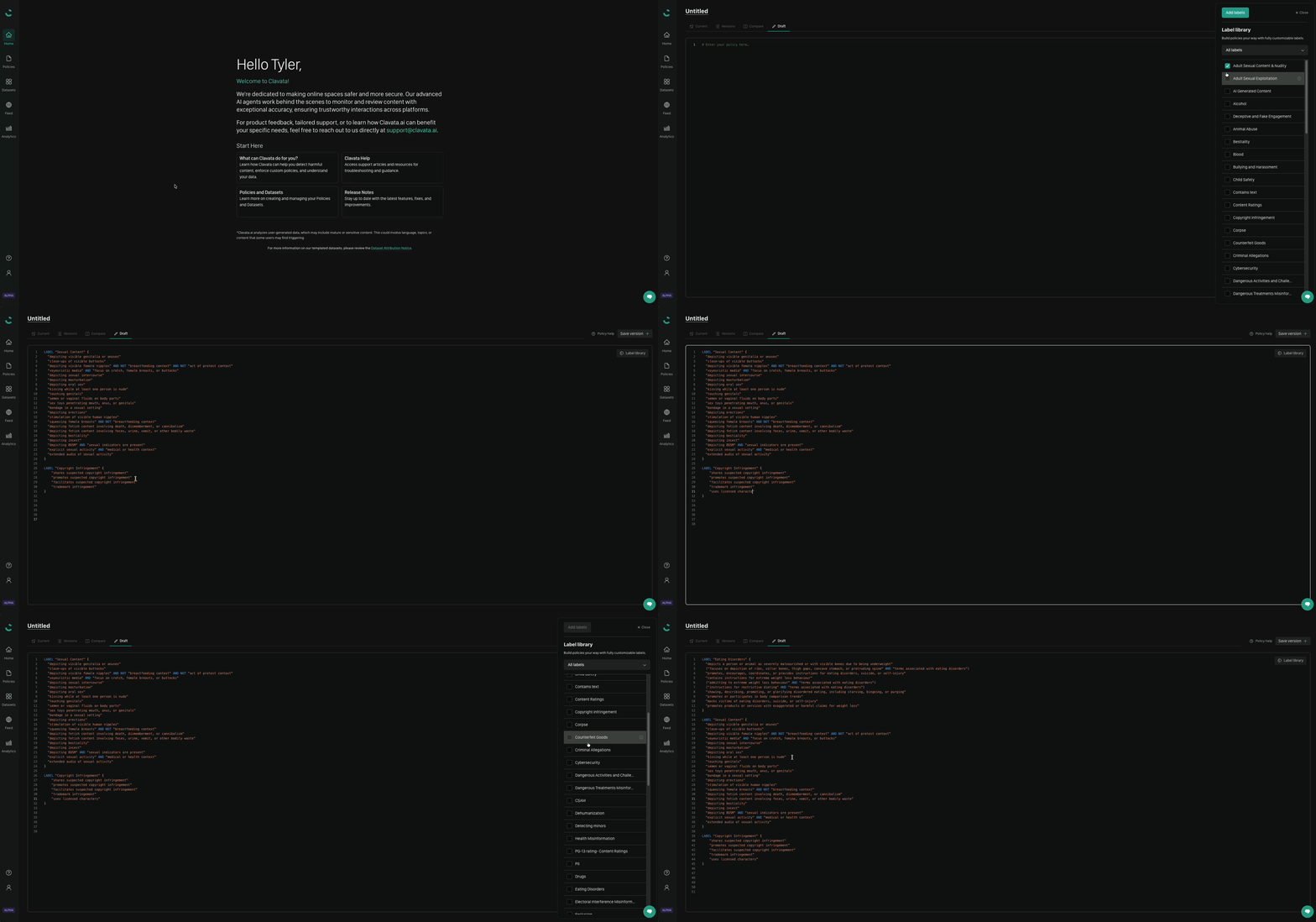
When you start the Create Policy flow, you can choose to begin with a blank policy. From the editor, you will see the option to browse the Label Library.
Select the labels you wish to include (e.g., Hate Speech, Harassment).
Moonbounce will automatically populate your blank policy with the selected content.
It is very important to test any labels against a labelled dataset via the UI
to ensure the label(s) are catching what you want!
Templates, Not References: When you add a label from the library, it is copied into your policy as a standalone template. It does not maintain a link to the library version.
No Auto-Updates: Since these are static templates, updates or improvements made to the global Label Library will not automatically propagate to policies where you have already added them. You are free to modify the added code to suit your specific needs.